
Roles and authorisations in the EHP
The authorisation coordinator (AC) plays a central role when using the EHP and acts as an extension of FINMA. He or she adds users making use of the EHP for an institution or organisation and allocates them all relevant roles, authorisations and tasks.
-
Who has access to the EHP: internal and external users
-
For institutions and organisations working with the EHP, an authorisation coordinator (AC) must enter all authorised users of the platform for that institution. FINMA distinguishes here between internal and external users. “Internal users” are essentially individuals working at the institution or organisation. “External users” do not work at the institution but require access to certain surveys and submissions of said institution. These users are normally service providers (e.g. third parties working on a survey or application). They perform specific assignments on behalf of the institution. The institution or organisation must explicitly authorise these external users to use the EHP.
All users of the EHP are allocated specific roles. Internal and external user groups with the same role have partially different authorisations. For example, internal users are able to view all approved and completed submissions to FINMA processed via the EHP and not marked as “confidential”. External users can only see submissions for which they have been directly authorised. A different situation pertains to FINMA surveys taking place via the EHP. Only authorised persons are able to view these, regardless of whether they are internal or external.
It is the AC’s task to enter users as internal or external.
The roles and tasks of the AC are described on this page. The other roles and functions on the EHP can be found on the following linked page.
Other roles and functions when using the EHP
-
The authorisation coordinator (AC)
-
The AC assumes a central role in the EHP for supervised institutions, supervisory organisations and audit firms. The AC is responsible for his or her institution or organisation’s user administration.
The AC is managed by FINMA and is always an internal user.
The AC’s tasks comprise the following:The AC manages EHP user administration for his or her institution or organisation and assigns roles and authorisation rights to registered users. This includes registering, creating, changing, deleting and certifying users. The AC is the only role requiring confirmation and management by FINMA. FINMA accordingly delegates authorisation management to the institution or organisation.
The roles in the EHP include manager, employee, lead auditor (only for audit firms) and employee light (only for audit firms and supervisory organisations). The individual roles are listed on the page entitled “Roles and functions when using the EHP”.The AC is the point of contact with FINMA for surveys in the EHP. FINMA informs the AC by email when the survey commences. The AC assigns the incoming survey to the person responsible for further processing at the institution or organisation. At supervised institutions this is the manager and at audit firms it is the lead auditor.
The AC notifies FINMA electronically of changes to selected master data of the institution.
The AC is the single point of contact (SPOC) to FINMA in connection with the EHP. It acts as an extension of FINMA for support requests within the institution or organisation.
-
Registration of an authorisation coordinator
-
As far as possible, a minimum of two ACs must be registered with FINMA per institution or organisation. Both initial registration and changes to ACs take place exclusively via electronic transfer of the online form on the FINMA website. Following receipt of the completed form, FINMA confirms the details in writing to the institution or organisation. On expiry of the deadline specified in the confirmation letter, the registered ACs receive an email with confirmation and instructions for accessing the EHP as an AC (assuming the institution or organisation does not provide instructions to the contrary).
-
Changing an authorisation coordinator
-
FINMA must be informed of changes relating to an AC. The same online form on the FINMA website is available for this as the one used for registering an AC. The following changes can be made:
Changing or deleting an existing AC
A change might comprise new contact data, while deletion takes place if, for example, the AC leaves the institution or organisation. It must be borne in mind that changing the email address of an AC also automatically entails the withdrawal of their rights and necessitates the creation of a new account with the new email address. In this case the old account will expire and the initial registration process will have to be carried out again. If deletion is requested, the AC’s rights will be withdrawn immediately following receipt of the request.
Replacing an existing AC
FINMA must also be notified if an existing AC leaves the institution or organisation or is replaced by another person. FINMA will confirm the changes to the institution or organisation in writing. Unless the institution or organisation instructs otherwise, the changes will take effect on expiry of the deadline specified in the confirmation letter. The person replaced as AC will then no longer have any AC rights in the EHP. However, if they still have manager or employee rights, they will still be able to assume tasks for the institution. Should the AC leave the institution or organisation, these roles must also be removed or the person deleted in the “Administration” menu item.
-
Administration of EHP users by the AC
-
The AC administers the users for the institution or organisation. The “Administration” menu item is provided in the EHP for this purpose (see illustration).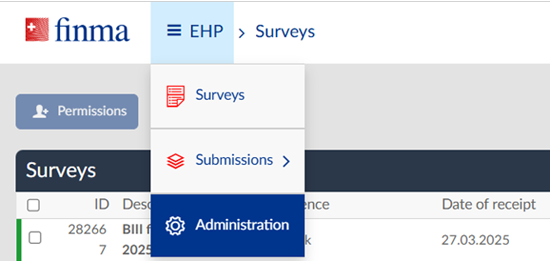
The AC has a range of options in the administration mask to create and manage users.
-
Adding new users
-
The AC can create new users with the “Add user” button. The following details are required for this (see illustration below):
- First name
- Last name
- Email address
- Allocation of role
When the AC has added a new user, such user, if not already registered (e.g. at another institution) will receive an invitation by email to register for the FINMA portal. The new user can access the EHP and the respective institution via the FINMA portal following successful initial registration.
Please note:
The email address serves as a unique user name and is not checked by the EHP. Errors or mistakes when entering the e-mail address may result in the email with the invitation to register not being sent or an unauthorised person receiving access to the EHP.
Each email address may only be used once for the same institution in user administration. The system will generate an error message if an email address is used twice.
-
Changing users
-
Existing users can only be changed to a certain extent in the EHP. The AC can change the first name, last name, email address and role at any time. To do so, the AC opens the user’s details in the “Administration” menu item and amends the values. The changes are stored by clicking “Save” or “Save and re-certify” (see illustration below).

Please note:
The AC role cannot be independently changed by the institution. This role is managed by FINMA. Changes to ACs must be notified to FINMA using the corresponding online form on the FINMA website.
Name changes are not automatically reconciled between the EHP and the FINMA portal. A name changed by the AC must be manually entered by the user by logging into the FINMA portal and clicking on “Edit user data”.

-
Deleting users
-
Every AC can delete added users, for example due to departure or an internal change of position. The “Recycle Bin” button is used for deleting (see illustration below). However, caution is advised when deleting. Prior to deleting users, their allocation to an ongoing survey or submission must be checked. Users should not be deleted if they have rights to an ongoing survey or submission. Their rights must first be transferred to other active users. The following steps must be taken in the predefined order before users are deleted by the AC:
- Check whether the user is actively involved in an ongoing survey or submission.
- Transfer the survey or submission to another user.
- Delete the user in the “Administration” mask.

Please note:The AC role cannot be independently deleted by the institution. This role is managed by FINMA. Deletions of ACs must be notified to FINMA using the corresponding online form on the FINMA website. Once FINMA has processed the notification and deleted the AC, this person will lose their AC rights on the EHP.
Users may have other roles alongside the AC role. In this case a request submitted via the form to delete a person as AC will only result in withdrawal of the AC role. The other roles in the EHP will be retained and must be deleted by the remaining ACs.

-
Certifying users
-
The EHP is configured so that all active users have to be confirmed by the AC after a year at the latest. The AC is informed by email of user accounts that are approaching expiry. This does not include the AC’s own account. Certification is carried out via the “Save and re-certify” function. The accounts of the users must first be opened in the “Administration” menu item (see illustration above). Users automatically lose their access rights to the EHP if they are not re-certified within a year.
They receive a message from the system when logging in that their user account has expired and must be renewed. Alternatively, if they have access to the EHP for multiple institutions, the relevant institution will no longer appear for selection when logging in. In these cases users must contact their AC. If no re-certification takes place over two years, the user account will be automatically deleted by the system.
Please note:
In the absence of certification, the user will lose access to the EHP for the institution in question. Upon re-certification by the AC, users will be able to access the relevant dossiers for the institution in the EHP again. ACs do not require certification. They are managed by FINMA and remain active until the institution requests a change or deletion.
-
Reporting changes in the institution’s master data
-
The AC can report selected institution-specific master data changes via the EHP (with the exception of changes requiring approval). The “Report change” button is provided to the AC under the “Administration” menu item for this purpose. If the AC clicks on this button, a preconfigured email message will open (see following illustration). This can be used to carry out the changes to the master data concerned.
The following master data changes can be reported to FINMA in this way:- Address (main address, billing address etc.)
- Contact data (telephone, fax, email)
- Correspondence language
-
Allocation of surveys
-
FINMA informs the AC by email of surveys via the EHP. No other persons at the institution or organisation are informed. ACs must therefore ensure that institutions are able to receive surveys (for instance during holiday absences) at all times. The AC must allocate each new survey to the assigned users (see illustration below). The surveys cannot be processed until they have been allocated. The institution is responsible for ensuring that at least one AC is available at all times to perform this allocation.
The assigned users for surveys are managers at institutions and lead auditors at audit firms (for details of the roles see “Roles and functions when using the EHP”).

The AC can authorise registered users for the survey via “Manage permissions”. That is why the manager role (MNG) or a lead auditor (LAUD) for audit firms is required (see illustration below). The MNG or LAUD can then authorise other persons as employees or auditors for the survey, provided the AC has already entered these persons in the EHP as users.

Once the AC has allocated the role of MNG or LAUD to the relevant persons, they will receive email notification. They can then administer and submit the survey themselves.