
Information for audit firms and supervisory organisations concerning submissions and surveys in the EHP
The EHP offers various forms of submission and survey in which AFs or SOs are involved. Indirect surveys sent to AFs (concerning their institutions) are already established. Other possible forms involving AFs or SOs are described in the following sections.
-
Placing an AF or SO in copy upon submission
-
It is also possible for the AF or SO to be placed in copy for notification purposes when submissions and surveys are submitted by the financial intermediary (FI). Notification of the AF/SO by the FI can be configured by FINMA as an optional or mandatory parameter.
-
Handing over the dossier for checking by the AF/SO
-
Upon implementation of the new supervisory approach for portfolio managers and trustees in accordance with the FinIA, a new procedure was also introduced in the EHP for involving the SO. The procedure can also be applied to AFs (as long as the EHP template is accordingly configured by FINMA). The procedure is described in detail below.
Procedure description: direct survey and submission with AF/SO interaction

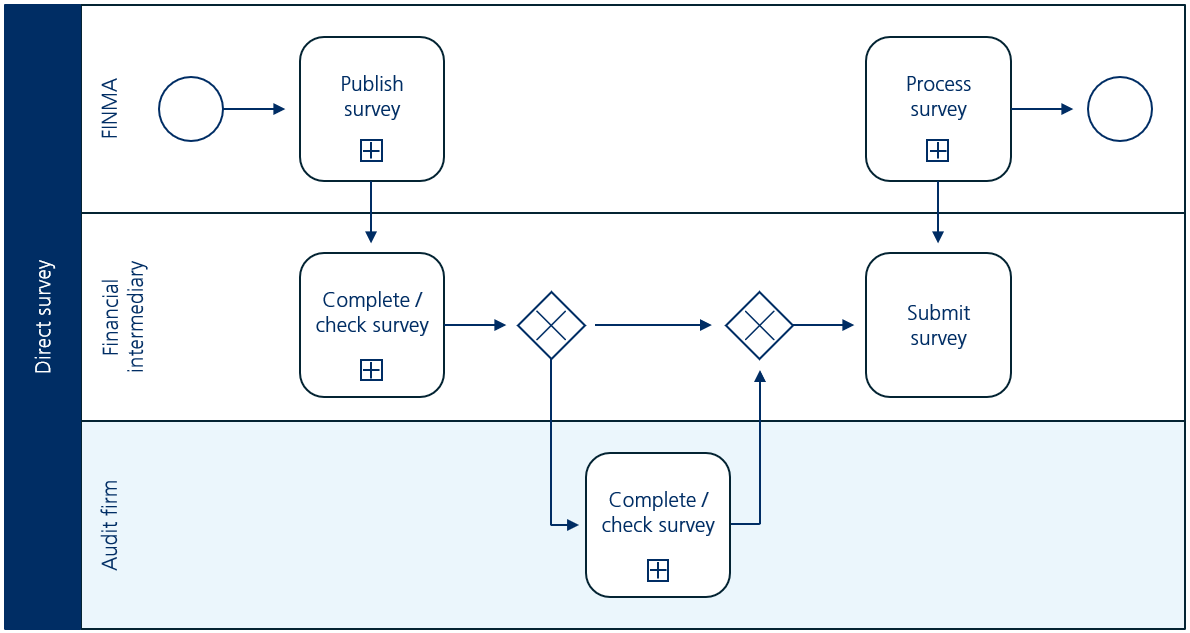
Procedural process If the submission/survey (hereinafter referred to as the dossier) permits system-supported interaction with the AF/SO, FIs can draw on their AFs/SOs for processing/checking the dossier. Task of the AF/SO in this procedure (highlighted in blue - The authorisation coordinator (AC) is informed by email than an FI has handed over responsibility for a dossier to its AF/SO.
- The AC specifies the person responsible for the dossier (e.g. lead auditor, employee light). This person is then notified of this by email.
- The person responsible checks the dossier. Both parties, FI and AF/SO, can view the dossier but only the FI can submit the dossier to FINMA.
- The responsible person at the AF/SO confirms or rejects the dossier.
-
Display in EHP
-
All dossiers are shown in the list of surveys/submissions (“for checking” and “in copy”) for which the user has been authorised. The authorisation coordinator(s) (ACs) can see all the dossiers of their AFs/SOs. All other users can only see those dossiers for which they are entered as responsible employees (EMPL).

Different actions are available depending on the status of the dossier and the authorisations:Element Description Button 
Öffnet den Filterbereich der Tabelle.
Slider Display hidden content Damit können ausgeblendete Dossiers wieder eingeblendet werden. Sie erscheinen dabei in kursiver Schrift.
Slider Show all Also displays surveys that have already been processed and returned to the financial intermediary.
Button Authorisations This button can be used to allocate the authorisations for multiple surveys simultaneously (bulk allocation).
Button Hide for me / display for me Hides and displays dossiers in the overview.
Button Export files Enables multiple dossiers to be exported (including their entire contents in different formats). Button Export list This button can be used to export the entire list of EHP dossiers to an Excel file.
Icon 
Marking of surveys in support mode. FINMA can view the survey regardless of the status.
Important: support mode is exclusively activated/deactivated by the AF. FINMA does not automatically receive notification when support mode is activated. This function has been developed for the assistance of support queries that are resolved by telephone, for example.
Surveys The surveys are displayed in the left area of the view. Clicking on a row displays all individual surveys allocated to the AF in the right area of the view (see illustration above).
Column ID Identification number of the individual survey.
Column Institution Name of institution.
Column Authorisation Authorisation of the institution that the individual survey concerns.
Column Date of receipt Date by which the individual survey must be submitted at the latest. Column Submission date Date by which the individual survey must be submitted at the latest.
Column FINMA KAM FINMA employee responsible for or administering the survey.
Column Status Column AF/SO confirmation ... Column Survey with delivery note Click on table row Opens the view for processing the individual survey.
Button 
Opens a pop-up window for defining the employees of the survey. In an initial step, the authorisation coordinator (AC) must define the lead auditor (LAD) for each individual survey. The LAD can then in turn determine further auditors (ADs) (please note: the AC is also authorised to do this).
-
For a person to be selected as lead auditor, they must hold the role of “lead auditor (LAD)” in authorisation management.
-
For a person to be selected as auditor, they must hold the role of “auditor (AD)” in authorisation management.
Button 
Submits the individual survey to FINMA.
Button 
Validates the individual survey.
Button 
Opens a pop-up window for handing over the individual survey to the FI (button only appears if system-supported interaction is permitted).
Button 
Opens a page with administrative details of the individual survey (e.g. submission date, deadline extension etc.).
Button 
Shows other hidden actions that for space reasons are not displayed directly.
Special procedure: selection of a new audit firm- The procedure for selecting the AF can be carried out by the supervised institution via the EHP.
- Notification of selection of an AF can be sent to the new AF by the institution via the EHP.
- The authorisation coordinators (ACs) of the new AF are subsequently notified via email.
- An AC must allocate the person responsible the role “employee light” in the EHP administration.
- The person responsible then has access to the notification and can insert necessary enclosures where required (declaration of acceptance of mandate and questionnaire on services) and send the notification back to the institution.
- The institution can then submit the complete notification to FINMA.
-

-
Further specific functions for AFs/SOs
-
- AF in copy for direct surveys sent to FIs: The AF can be placed in copy for the publication of surveys sent directly to the FI. If the function is used by FINMA, the ACs of the AF will be notified of publication. They will receive an email with a list of the institutions affected and information such as the EHP form, any enclosures or a link for further details.
- Test surveys sent to AFs/SOs: FINMA can publish test surveys in advance for AFs or SOs. These can be used to test new functions and compatibility with own systems. Test surveys are marked as such.
- Communications between AFs/SOs and FINMA: In the case of submissions and surveys including a check by the AF/SO, direct communication with FINMA and vice versa is facilitated in the dossier. Both the button and the content displayed in the notification thread are only visible to the AF/SO and FINMA.
- AF in copy for direct surveys sent to FIs: The AF can be placed in copy for the publication of surveys sent directly to the FI. If the function is used by FINMA, the ACs of the AF will be notified of publication. They will receive an email with a list of the institutions affected and information such as the EHP form, any enclosures or a link for further details.